Kernel-Based Hough Transform
Welcome to the home page of the Kernel-Based Hough Transform. Here we present an improved voting scheme for the Hough transform that allows a software implementation to achieve real-time performance even on relatively large images.
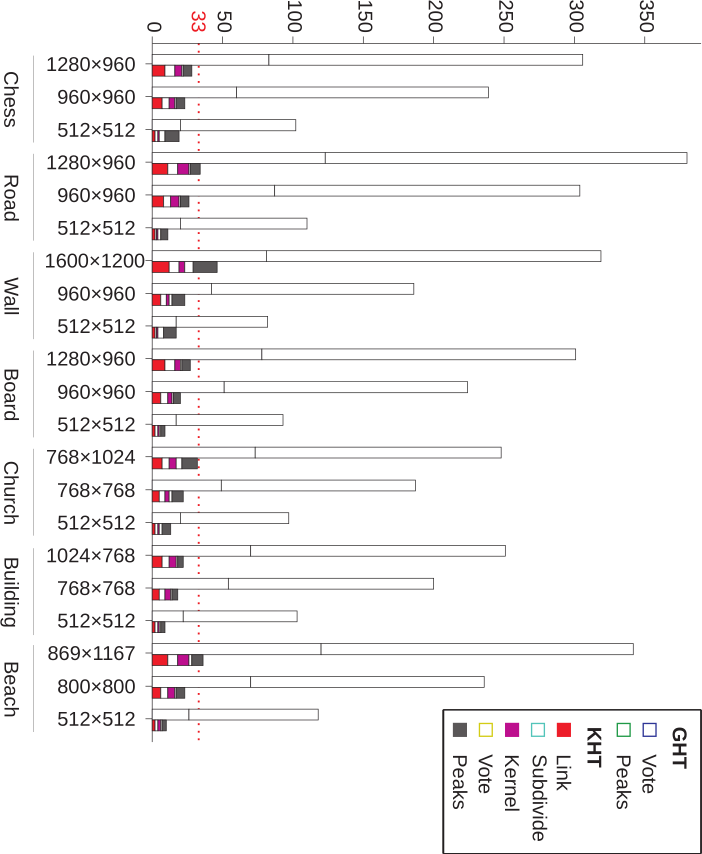
Our real-time line detection procedure (a.k.a KHT) operates on clusters of approximately collinear pixels. For each cluster, votes are cast using an oriented elliptical-Gaussian kernel that models the uncertainty associated with the best-fitting line with respect to the corresponding cluster. The bar graph shows the comparison between the processing times of the gradient-based Hough transform (GHT) and of the KHT. For each input image (horizontal axis), the left bar represents GHT and the right one represents KHT. The height of the bar is given by the sum of the time spent by each step of the corresponding approach, in milliseconds (ms). The red dotted line defines the mark of 33 ms, approximately 30 Hz. The proposed approach not only significantly improves the performance of the voting scheme, but also produces a much cleaner voting map and makes the transform more robust to the detection of spurious lines.
Our real-time plane detection procedure (a.k.a D-KHT) extends the KHT to operate on clusters of approximately coplanar pixels in depth images.
The KHT was originally developed by Leandro A. F. Fernandes and Manuel Menezes de Oliveira Neto. Then, Frederico A. Limberger and Manuel extend the KHT voting scheme to the detection of planar regions in unorganized point clouds (see this page for details). Finally, Eduardo Vera Sousa, Djalma Lucio, Leandro, and Luiz Velho developed the D-KHT for detecting planes in depth images.
Here you find all publicly available material about the KHT and the D-KHT.